

Submittal Assistant for OSFM Submittals
Prepare Drawing Packages in Minutes, Not Hours.
Review, name, organize, version, and export individual PDF drawing sheets using a workflow designed for California OSFM submittal preparation.
All trial features are available for review, including watermarked export of a limited number of sheets. Unlimited, watermark-free export requires an active license.
Side by Side
Minutes vs Hours of Renaming
The same 120-sheet drawing set, prepared two ways at the same time — Submittal Assistant in real time against renaming every sheet by hand at normal typing speed.
Real time — no speed-ups. One misnumbered sheet can cause a rejection at OSFM prescreen; Submittal Assistant automatically names each sheet correctly.
Why Submittal Assistant?
A Faster, More Controlled Workflow
Reduce repetitive file preparation while retaining control over sheet names, order, version indicators, and final exported files.

Save Hours
Process large drawing packages without manually extracting and renaming every individual sheet.

Reduce Errors
Review proposed filenames, sheet order, and version information before creating the final files.
Stay Organized
Create consistently ordered output files using folder and four-digit sheet-order indicators.
Current Product
Submittal Assistant for OSFM Submittals
A purpose-built desktop application for preparing individually named PDF drawing sheets for OSFM submittal packages.
Everything Needed to Prepare the Package
Move through the drawing set, confirm sheet information, apply version indicators, and generate organized individual PDFs.
Feature 01
Smart Sheet Naming
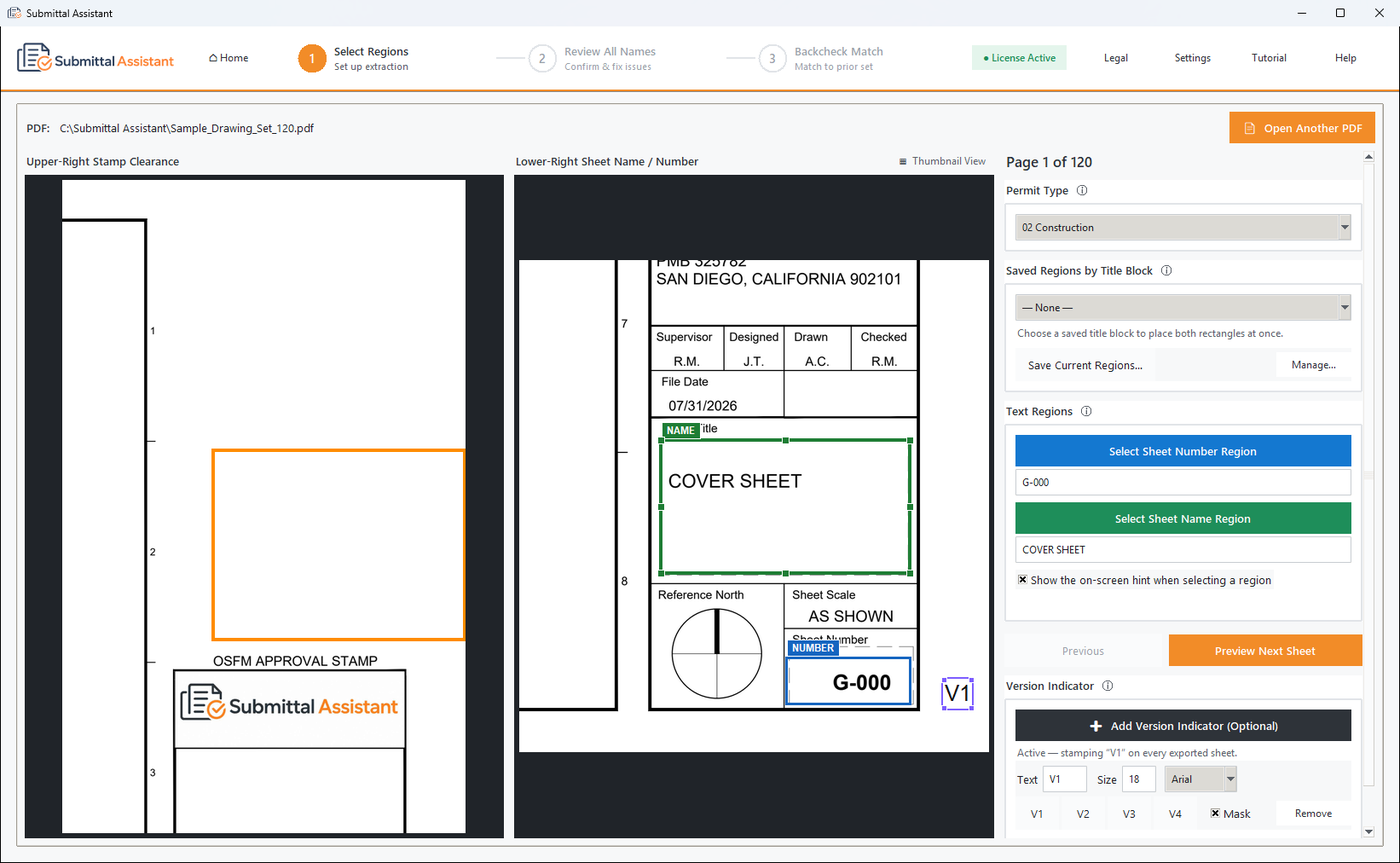
Draw one rectangle around the sheet number and one around the sheet name, once. Every sheet in the set is read the same way and named to the OSFM format automatically.


Feature 02
Review Every Name Before Export
All names, sequence numbers and final filenames in one table, with over-length names and stamp-clearance results flagged, before a single file is written.
Feature 03
Thumbnail View
Every sheet as a large thumbnail with its filename beneath it, so you can confirm each name belongs to its sheet at a glance.


Feature 04
Sheet Preview and Quick Edit
Select any sheet to see a close-up of the two title-block fields the name was read from, and correct either one right there.
Feature 05
Saved Regions by Title Block
Save the rectangles for a firm’s title block once and reapply them to the next set in one click. Presets can be exported and shared with your team.


Feature 06
Multiple Title Blocks in One Set
A consultant’s sheets use a different title block? Give that range of sheets its own rectangles and the rest of the set is untouched.
Feature 07
Version Indicators
Stamp V1, V2 or V3 in the bottom-right corner of every exported sheet, as OSFM’s guidelines require, without altering the source PDF.

Feature 08
Backcheck Comparison
Point it at the sheets you exported last time. Names are matched automatically, new sheets get a .1 sequence, and missing sheets are flagged.
Feature 09
Batch Export
One click writes an individually named PDF for every sheet, in submittal order, into the package folder, ready to upload.


Feature 10
Supporting Documents Renamer
Specifications, calculations, reports and cut sheets renamed to the OSFM document format as copies — your originals are never changed.
From Combined PDF to Organized Package
A guided workflow keeps the process efficient without removing user review.
01
Load
Open the combined drawing package.
02
Identify
Select title-block information.
03
Review
Confirm names, order, and versioning.
04
Export
Generate the individual PDF sheets.
Local Processing
Your Drawing Files Stay on Your Computer
Drawing-package processing occurs locally on the workstation. The application does not require your drawing files to be uploaded to an external processing server.
- Local PDF processing
- Original source package retained
- User-controlled output location
- No agency portal access
- No automatic submittal transmission
Frequently Asked Questions
Answers to common questions about the product and trial.
What agencies are currently supported?
The current product is designed for California OSFM drawing-submittal preparation. DSA support is planned for a future release, as is a Submittal Log for tracking every submittal, backcheck and agency response across a team.
Does the application modify my original PDF?
No. The application creates new output files based on your selections. The original source package remains unchanged.
Can I review sheet names before export?
Yes. The workflow allows you to review, correct, and confirm proposed filenames before creating the final individual PDF files.
Are my drawing files uploaded to the cloud?
No. Drawing-package processing is performed locally on the computer. The software does not upload drawing files to an external processing server.
What is included in the free trial?
The free trial provides 7 days of access to the complete workflow on your own PDF files, including export of a limited number of sheets with a trial watermark. Unlimited, watermark-free export is enabled after activating a paid license.
Does the application submit files to OSFM?
No. Submittal Assistant is a file-preparation tool. The applicant remains responsible for reviewing and submitting the final package through the applicable agency process.
Prepare Your Next Drawing Package More Efficiently
Run the complete workflow on your own drawings before purchasing, including a limited watermarked export. Unlimited, watermark-free export requires an active license.